Command Pattern (디자인 패턴 6장)
Command Pattern (디자인 패턴 6장)
Command Pattern (디자인 패턴 6장)
커맨드 패턴 정의
커맨드 패턴을 이용하면 요구 사항을 객체로 캡슐화 할 수 있으며, 매개변수를 써서 여러 가지 다른 요구 사항을 집어넣을 수도 있습니다.
또한 요청 내역을 큐에 저장하거나 로그로 기록할 수도 있으며, 작업취소 기능도 지원 가능합니다.
아래의 코드를 보자.
1
2
3
4
5
6
7
8
9
10
11
12
13
14
15
16
17
18
19
20
21
22
23
24
25
26
27
28
29
30
31
32
33
34
35
36
37
38
39
40
41
42
43
44
45
46
47
48
49
50
51
52
53
54
55
56
57
58
59
60
61
62
63
64
65
66
67
68
69
70
71
72
73
74
75
76
77
78
79
80
81
82
83
84
85
86
87
88
89
90
91
92
93
94
95
96
97
98
99
100
101
102
103
104
105
106
107
108
109
110
111
112
113
114
115
116
117
118
119
120
121
122
123
124
125
126
127
128
129
130
131
class CommandPatternTest {

    class RemoteControl {
        private val onCommand: HashMap<Int, Command> = hashMapOf()
        private val offCommand: HashMap<Int, Command> = hashMapOf()
        private var unDoCommand: Command? = null

        fun addCommand(slot: Int, onCommand: Command, offCommand: Command) {
            this.onCommand[slot] = onCommand
            this.offCommand[slot] = offCommand
        }

        fun onButtonWasPushed(slot: Int) {
            onCommand[slot]?.let {
                it.execute()
                unDoCommand = it
            }
        }

        fun offButtonWasPushed(slot: Int) {
            offCommand[slot]?.let {
                it.execute()
                unDoCommand = it
            }
        }

        fun unDoButtonWasPushed() {
            unDoCommand?.let {
                it.undo()
            }
        }
    }

    interface Command {
        fun execute()
        fun undo()
    }

    class Light {
        fun on() {
            println("Light On")
        }

        fun off() {
            println("Light Off")
        }
    }

    class LightOffCommand(private val light: Light) : Command {
        override fun execute() {
            light.off()
        }

        override fun undo() {
            light.on()
        }
    }

    class LightOnCommand(private val light: Light) : Command {
        override fun execute() {
            light.on()
        }

        override fun undo() {
            light.off()
        }
    }

    class KitchenLight {
        fun on() {
            println("KitchenLight On")
        }

        fun off() {
            println("KitchenLight Off")
        }
    }

    class KitchenOffCommand(private val kitchenLight: KitchenLight) : Command {
        override fun execute() {
            kitchenLight.off()
        }

        override fun undo() {
            kitchenLight.on()
        }
    }

    class KitchenOnCommand(private val kitchenLight: KitchenLight) : Command {
        override fun execute() {
            kitchenLight.on()
        }

        override fun undo() {
            kitchenLight.off()
        }
    }

    @Test
    fun testRemoteControl() {
        val remoteControl = RemoteControl()
        val light = Light()
        remoteControl.addCommand(
            slot = 0,
            onCommand = LightOnCommand(
                light
            ),
            offCommand = LightOffCommand(
                light
            )
        )

        val kitchenLight = KitchenLight()
        remoteControl.addCommand(
            slot = 1,
            onCommand = KitchenOnCommand(
                kitchenLight
            ),
            offCommand = KitchenOffCommand(
                kitchenLight
            )
        )

        remoteControl.onButtonWasPushed(0)
        remoteControl.offButtonWasPushed(0)
        remoteControl.onButtonWasPushed(1)
        remoteControl.offButtonWasPushed(1)
        remoteControl.unDoButtonWasPushed()
    }

}
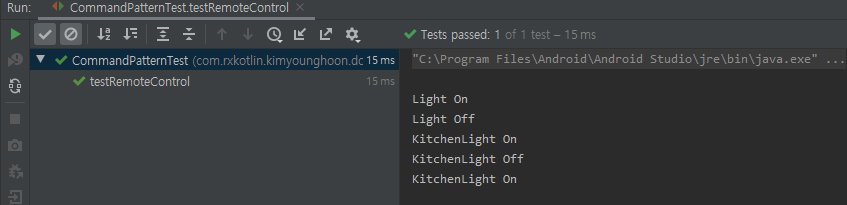
리모트컨트롤에서 Command 를 추가 해서 on,off 버튼을 사용할 수 있고 unDoCommand 를 통해 마지막 실행한 명령을 되돌릴 수 있다. 아래는 테스트 결과 이미지이다.
이 기사는 저작권자의 CC BY 4.0 라이센스를 따릅니다.